There's a moment in every serious network analysis workflow where software timestamps stop being good enough. For most use cases — general troubleshooting, capacity planning, security monitoring — they're fine. But when the question is "exactly how long did that order take to reach the exchange?" or "did that packet arrive before or after that one?", microsecond-level precision isn't close to sufficient. You need nanoseconds. In some cases, you need less.
This is where hardware timestamps come in — and where the packet broker sitting upstream of your capture appliance becomes a critical part of the timing picture.
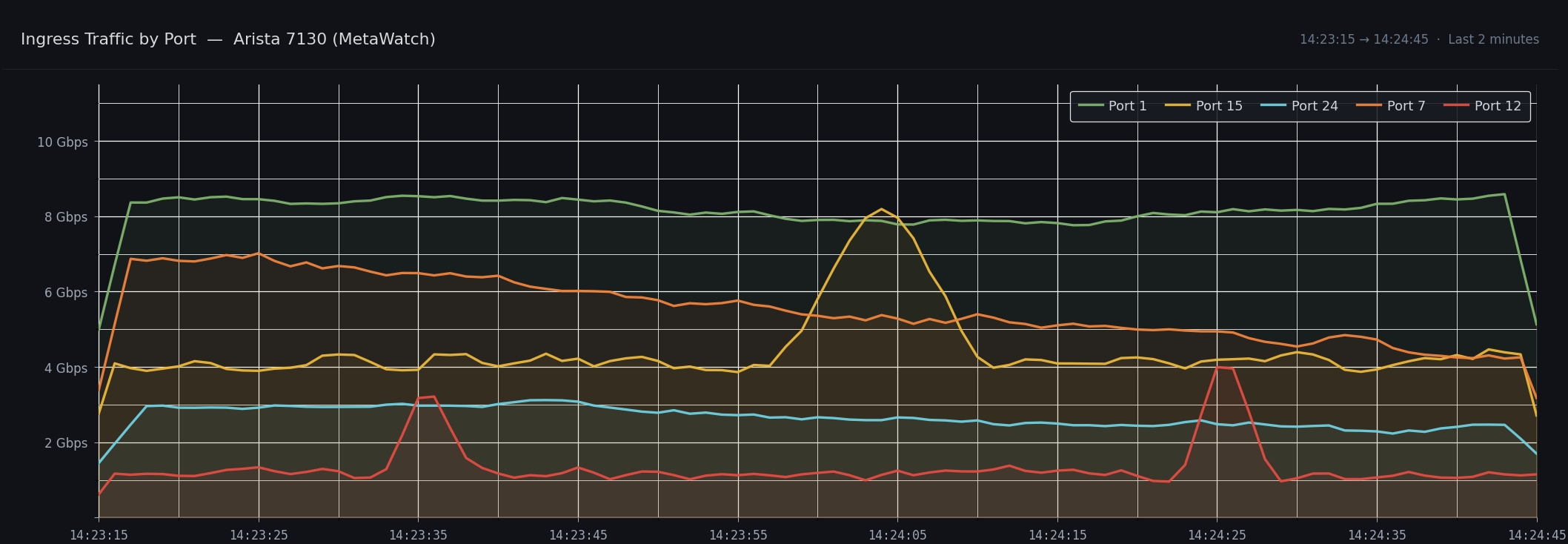
Arista 7130 trailer data
Why Software Timestamps Aren't Enough
When a packet arrives at a standard NIC, the timestamp applied to it reflects when the OS or driver got around to recording it. That might be hundreds of microseconds after the packet actually hit the wire. In a busy system under load, it can be worse. The gap between wire arrival and recorded timestamp is variable, non-deterministic, and effectively useless for precision latency measurement.
Hardware timestamps solve this by recording the packet's arrival time in silicon, at or very close to the physical port, before any software has a chance to introduce jitter. The timestamp is applied in nanoseconds — or better — and travels with the packet through the rest of the capture pipeline.
In latency-sensitive environments — electronic trading, high-frequency market making, co-location infrastructure — this distinction is everything. A few microseconds of timing error can be the difference between a valid latency measurement and noise. It also matters in telecoms for synchronisation verification, in regulatory compliance (MiFID II / RTS 25 mandates timestamp accuracy for reportable transactions), and in any environment where packet ordering across multiple capture points needs to be reconstructed accurately.
Where FMADIO Fits In
FMADIO capture appliances sit at the end of the monitoring chain. Traffic arrives from a TAP or mirror port, usually via a packet broker or aggregation switch that has already applied a hardware timestamp on ingress at the production link.
FMADIO always applies its own hardware timestamp on capture, using an onboard clock synchronised via NTP or PTPv2, capable of ~4ns precision, stored in standard pcap nanosecond format. This timestamp is always present in the raw captured data — nothing is discarded or overwritten at capture time.
When a packet broker timestamp format is configured, FMADIO uses that upstream timestamp for downstream functions — search, PCAP export, push to downstream systems — rather than the capture card timestamp. The raw data is always preserved as-is. This matters: it means timestamp format selection can be changed after the fact without re-capturing anything.
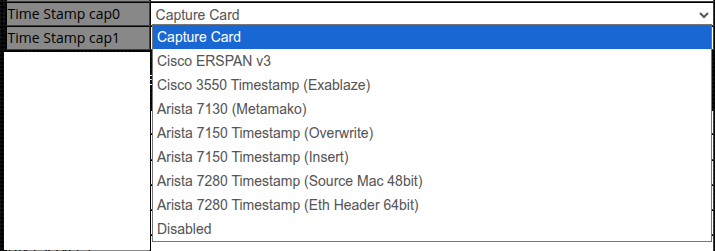
FMADIO Timestamp format selection
The Formats
FMADIO currently supports the following hardware timestamp formats from packet brokers and aggregation switches. Each has its own encoding, precision characteristics, and — in several cases — additional metadata fields beyond the timestamp itself.
Arista 7130 (Metamako)
The Arista 7130 series — formerly the Metamako product line before Arista's acquisition — uses an FPGA-based feature called MetaWatch for timestamping. It's an ultra-low-latency platform, with the active tap function replicating traffic in around 5ns.
MetaWatch appends a 16-byte (128-bit) self-contained trailer to each packet, with a valid FCS recalculated and appended, making timestamped packets routable by downstream devices. The combined seconds and nanoseconds fields total 64 bits, giving full UTC time with no need for keyframes.
The trailer includes both a Device ID and a Port ID, both user-configurable. This is particularly valuable in multi-tier capture architectures — even if traffic passes through multiple aggregation layers between the tap and the capture appliance, the Device ID and Port ID in the trailer identify exactly where on the network the packet was originally timestamped.
Timing precision is up to ±75 picoseconds when synchronised via PPS, using an onboard OCXO or optional Rubidium clock. Time sync is supported via NTP, PTP or PPS.
The 7130 format also supports custom TLVs — user-defined metadata fields that can carry additional information such as sequence numbers. Sequence numbers are worth calling out specifically: they allow a consumer to detect packet reordering that occurred after the timestamp was applied, which is distinct from reordering that occurred at the production network level.
Arista 7150 Timestamp (Overwrite) and Arista 7150 Timestamp (Insert)
The Arista 7150 series takes a different approach to timestamping, using the FCS field at the end of the Ethernet frame rather than adding a separate trailer. This reflects the 7150's position as an aggregation switch where minimising latency and overhead is a priority.
There are two modes:
Overwrite (replace-fcs): The original FCS is replaced with the timestamp. No bytes are added to the packet — frame size is unchanged — but the FCS is no longer valid. Downstream devices that perform FCS validation need to be aware of this.
Insert (before-fcs): The timestamp is inserted ahead of a freshly recalculated FCS. The frame is 4 bytes longer than the original, but it's a fully valid Ethernet frame with a correct FCS.
Both modes produce a 31-bit timestamp from an internal free-running 350MHz counter, which wraps every 6.135 seconds. A periodic keyframe packet is required to correlate the counter value back to real UTC time. This is a meaningful difference from the self-contained formats above — the consumer must track keyframes to maintain accurate absolute time.
From a practical standpoint, FMADIO supports both modes to match whatever a customer has already deployed. There's no strong reason to choose one over the other from FMADIO's perspective — it's dictated by the 7150 configuration in the existing infrastructure.
Arista 7280 Timestamp (Source MAC 48bit)
Rather than adding bytes to the packet, this mode overwrites the source MAC address field with the lower 48 bits of UTC time. The frame size is entirely unchanged — no bytes are added, no encapsulation overhead is introduced.
This matters specifically in environments running close to line rate. At 100G, even a small per-packet size increase translates to a measurable reduction in sustainable throughput. The Source MAC mode avoids this entirely, making it the practical choice when bandwidth headroom is tight and the source MAC of monitored traffic is either already known or not required for analysis.
The tradeoff is that the source MAC is not recoverable from the capture. This mode is therefore best suited to dedicated monitoring networks where traffic is received from known, fixed sources rather than general-purpose capture environments where MAC-level traceability matters.
As with the Eth Header 64-bit mode, the consumer must be PTP-synchronised to reconstruct the full 64-bit timestamp from the lower 48 bits, and must apply a serialisation-time offset to recover the true ingress timestamp.
Cisco ERSPAN v3
ERSPAN (Encapsulated Remote SPAN) is Cisco's protocol for tunnelling mirrored traffic across an IP network. Version 3 — also referred to as Type III — adds a hardware timestamp to the ERSPAN header, making it useful for latency measurement rather than just traffic mirroring.
The Type III header carries a 32-bit hardware-generated timestamp with 100ns granularity. Because it's 32-bit, the field wraps approximately every 7 minutes, which means consumers need to handle rollover carefully. An optional platform-specific sub-header can extend this to a full 64-bit timestamp by combining the base 32-bit value with a 32-bit extension field, with granularity configurable down to nanosecond level.
In addition to the timestamp, the ERSPAN v3 header carries a Port ID/Index field identifying the ingress port on the source switch. This is immediately useful for distinguishing traffic from different monitored links arriving on the same capture interface.
One practical consideration: ERSPAN tunnels over GRE/IP, which adds encapsulation overhead. FMADIO captures the full encapsulated packet as-is, and decapsulation happens on demand — during search, export or push operations. Because FMADIO supports packet capture up to >20kB, ERSPAN's encapsulation overhead doesn't cause the MTU headaches that can affect other capture solutions.
Cisco 3550 Timestamp (Exablaze)
The Cisco Nexus 3550-F (formerly ExaLINK Fusion from Exablaze, acquired by Cisco) is a purpose-built timestamping and aggregation switch with an FPGA-based architecture designed for ultra-low-latency environments.
The 3550-F appends a High Precision Timestamping (HPT) trailer to each packet. The trailer encodes the timestamp at 100 picosecond resolution — a finer encoding granularity than most other formats — alongside a port number and a device ID, enabling full traceability of where in the network a packet was captured.
The timestamp uses the upper 32 bits for seconds-since-epoch and the lower 40 bits for fractional seconds, giving it a self-contained full UTC representation with no need for keyframes or external reference packets.
Making Use of the Metadata
The timestamp itself is the headline, but several of these formats carry additional fields that are worth exploiting directly.
Ingress Port ID — present in ERSPAN v3, Cisco 3550, and Arista 7130 formats — tells you which physical port on the upstream switch a packet arrived on. In a typical deployment, a single FMADIO capture port may be receiving aggregated traffic from multiple monitored links via the broker. Without port metadata, all of that traffic looks identical at the capture layer. With it, you can split a single capture stream into logical per-link views in post-processing, apply per-link latency measurements, or filter to a specific link during search.
Device ID — in the Cisco 3550 and Arista 7130 formats — extends this further. In multi-site or multi-tier deployments where traffic from more than one aggregation switch is funnelled to the same capture appliance, the Device ID tells you which physical device applied the timestamp. Combined with Port ID, this gives you full network topology traceability from within the packet capture itself.
Sequence numbers — available as a custom TLV in the Arista 7130 format — allow detection of packet reordering introduced between the timestamping switch and the capture appliance. This is distinct from reordering at the production network level, and being able to separate the two is genuinely useful when diagnosing whether a latency or ordering anomaly is a production network problem or an artefact of the monitoring infrastructure.
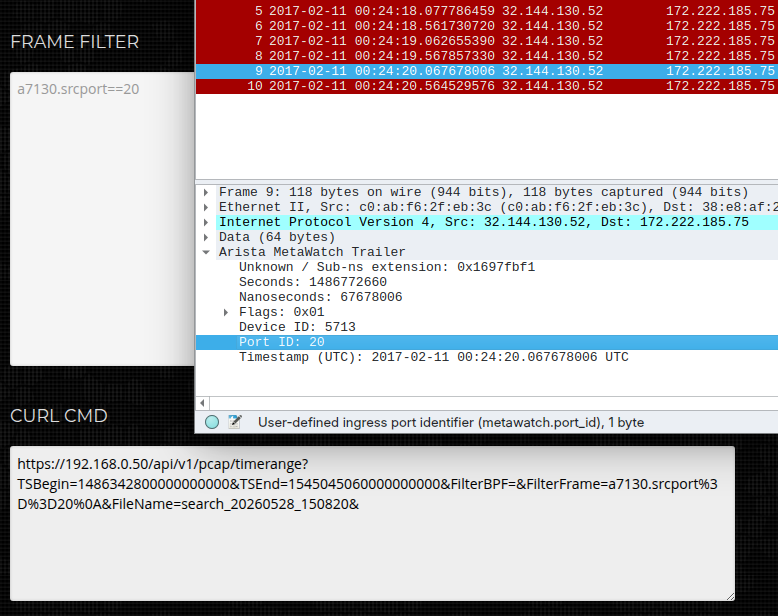
Metadata search in FMADIO UI (or CLI/API) and output to Wireshark
Need a Format We Don't Support?
Every format currently supported by FMADIO was added at customer request. That's not a coincidence — it reflects how the system is built.
Timestamp extraction in FMADIO is handled as post-processing, not within the core capture pipeline. The raw packet data is captured exactly as it arrives on the wire. Timestamp interpretation — stripping headers, reading trailers, extracting fields — happens downstream, on demand. This means adding support for a new format doesn't touch the capture engine at all. It's a contained, low-risk change.
The contrast with other approaches is stark. Vendors who bake timestamp decoding into the capture pipeline face a significantly more complex engineering problem when a new format appears — one that typically involves firmware changes, regression testing across the full capture stack, and long release cycles. Months, sometimes longer.
We've done new formats faster than that. If your packet broker or aggregation switch produces a timestamp format that isn't on the list, get in touch. The conversation is worth having.
If you'd like to know more about our products, please have a look at our Products page and if you would like to discuss this or any other use case, please hit the chat window below or email support@fmad.io.